Tweek at a glance
Tweek is a minimal weekly planner and to-do list: your whole week on one page, like a paper planner, with lists for everything that has no date yet.
Last updated: .
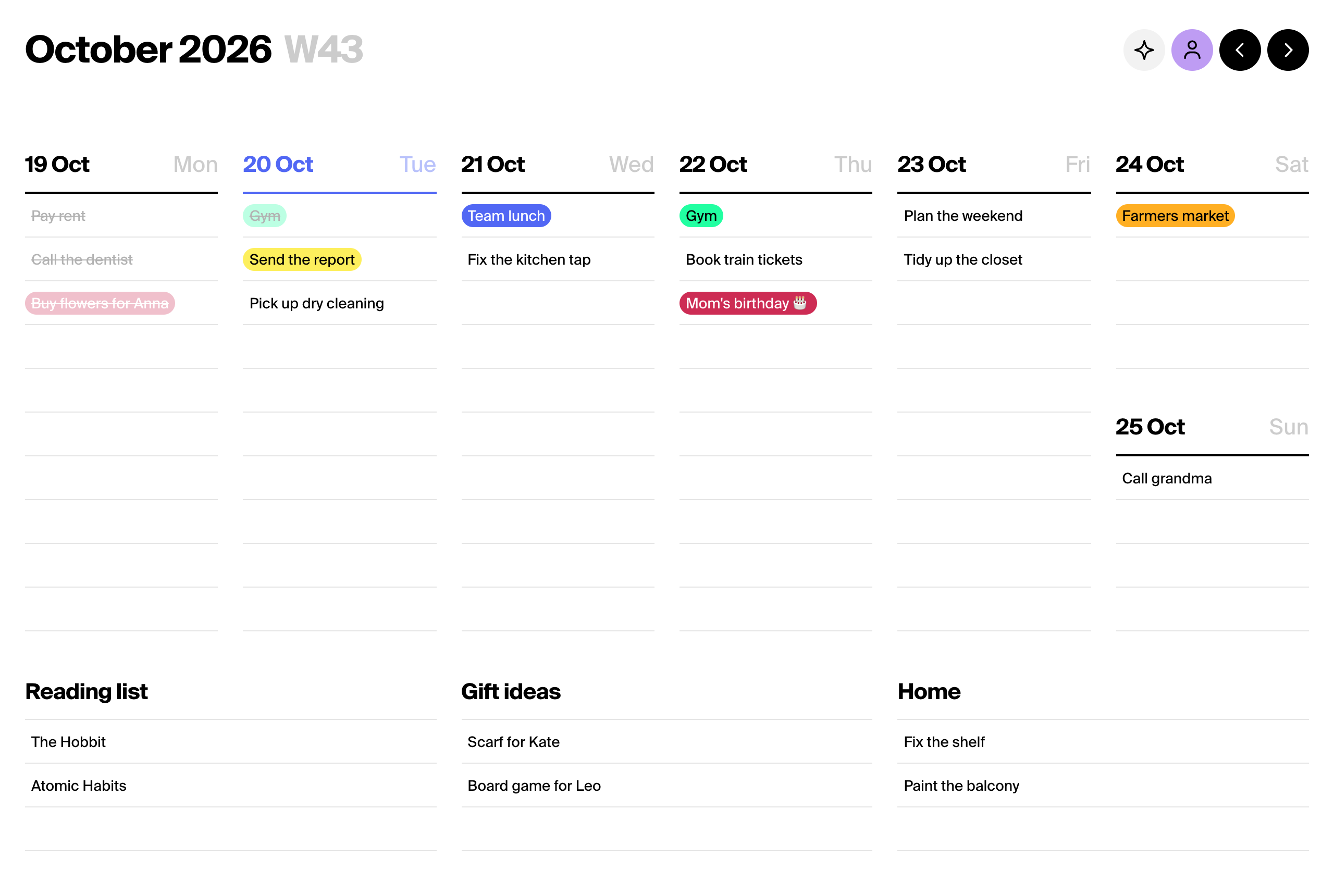
What it is
Tweek shows the whole week on one screen, Monday to Sunday, with tasks written straight into each day. Tasks that have no day yet go to Someday lists below the week.
A task can have a time, a note, subtasks, a color, a reminder and a repeat, like Gym every Tuesday at 7:00. You also get a monthly view, shared tasks and calendars, and a week you can print.
It is made for people who plan by the week: individuals, families, students, freelancers and small teams. It is not a project-management tool; there are no boards, assignees or Gantt charts.
Platforms
| Platform | Where to get it |
|---|---|
| Web | tweek.so, in any modern browser |
| iPhone and iPad | App Store |
| Mac | The same App Store app runs on the Mac |
| Android | Google Play |
One account works on every platform, and tasks sync between them.
Plans and prices
| Plan | Monthly | Annual | Who it covers |
|---|---|---|---|
| Free | $0 | $0 | One person, for as long as they like |
| Premium Individual | $5.99 | $49.99 ($4.17/mo) | One person |
| Premium Family | $9.99 | $89.99 ($7.50/mo) | Up to 4 people, each with their own account |
- One price per plan, not per user. On the web it is the same amount in USD and EUR.
- The annual Individual plan bought on the web comes with a 14-day free trial for first-time subscribers. The monthly plan and the Family plan start right away, without a trial.
- Individual can also be bought in the App Store and Google Play, where the price is set per country. Family is sold on the web only.
- Payments on the web go through Stripe. Cancel any time and Premium stays until the paid period ends. Then the account goes back to Free and keeps all its tasks.
The current prices are always on the pricing page.
Free and Premium
| Feature | Free | Premium |
|---|---|---|
| Weekly view, Someday lists, tasks with time and notes | Yes | Yes |
| Active calendars | 1 | Unlimited |
| Sharing a task, publishing a read-only calendar | Yes | Yes |
| ChatGPT app, Claude connector, Tweek MCP, REST API | Yes, lower monthly quota | Yes, higher monthly quota |
| Monthly view | No | Yes |
| Subtasks, recurring tasks, reminders | No | Yes |
| Custom colors, themes, hiding completed tasks | No | Yes |
| File and photo attachments, file export | No | Yes |
| Calendar sync: Google, Outlook, Apple Calendar, Apple Reminders, calendar links (.ics) | No | Yes |
Integrations
| Integration | What it does |
|---|---|
| Google Calendar | Events sit in your week next to your tasks, and edits go both ways |
| Outlook Calendar | The same for Microsoft 365 and Outlook.com calendars |
| Apple Calendar, Apple Reminders | Synced in the iPhone, iPad and Mac app |
| Calendar links (.ics) | Add any calendar by its subscription link and see its events in your week |
| ChatGPT | Ask ChatGPT to plan your week, and the tasks land in Tweek |
| Claude | The same in claude.ai, Claude Desktop and Claude Code |
| Tweek MCP | A remote MCP server for any AI assistant that speaks the Model Context Protocol |
| REST API | Read and write tasks and calendars |
Company and support
- Company: SIA SCADA, Rupniecibas 32b, Riga, LV-1045, Latvia (EU).
- Support: email hello@tweek.so, or Menu → Contact us in the app.
- Help center: help.tweek.so
- What’s new: the changelog, month by month.
- Legal: terms and privacy policy.
- Social: X, Threads, LinkedIn, Product Hunt.